

What Is a Service Level Agreement (SLA)? Definition, Types, and How to Calculate It
Last updated: April 28, 2026. This update adds a direct-answer summary, an "at a glance" reference block, an explicit "How to calculate SLA compliance" section with a formula, benchmark numbers for response and resolution times, and an expanded FAQ.
A Service Level Agreement (SLA) is a documented commitment between a support team and its customers that defines how fast tickets must be acknowledged and resolved, what uptime is guaranteed, and what happens when those targets are missed. SLAs turn vague promises like "fast support" into measurable numbers any team and any customer can agree on.
At a glance
- What it is: A documented commitment defining response, resolution, and uptime targets for a support service.
- Three main types: Response SLA (how fast the team acknowledges), Resolution SLA (how fast the team fixes), Issue-based SLA (different targets per priority).
- Compliance formula:
SLA compliance % = (tickets resolved within SLA / total tickets in window) × 100. - Common benchmarks: Critical issues - 1-hour response, 4-hour resolution. Standard issues - 8-business-hour response, 24-hour resolution.
- Internal counterpart: OLAs (Operational Level Agreements) - internal team-to-team agreements that make external SLAs achievable.
- Tracked by: Help desk software with built-in SLA timers, breach alerts, and compliance reporting.
SLAs are essential for IT teams, help desk managers, school districts, and service organizations that want to deliver consistent and measurable support. Without defined service levels, teams rely on guesswork. With SLAs, everyone knows what "good service" looks like and how performance is measured.
This guide explains the types of SLAs, how to calculate SLA compliance, when you need multiple agreements, how Operational Level Agreements (OLAs) support them, and how help desk software like Mojo Helpdesk makes SLA management simple.
What Is a Service Level Agreement (SLA)?
A Service Level Agreement is a contract or documented commitment between a service provider and a customer that defines:
- How fast the provider will respond
- How long resolution will take
- What level of uptime or availability is guaranteed
- What happens if targets are not met
According to TechTarget, an SLA typically includes measurable performance metrics and consequences for missing them.
In help desk environments, SLAs are often built into your ticketing software so response and resolution times are automatically tracked.
What Are the Main Types of SLAs?
Most help desk teams use three primary types of SLAs.
Response SLAs
A Response SLA defines how quickly your team must acknowledge a ticket.
For example:
- High priority issue: Response within 1 hour
- Standard issue: Response within 8 business hours
- Low priority request: Response within 24 hours
Response SLAs matter because customers want confirmation that someone is working on their issue. Even if resolution takes time, fast acknowledgment builds trust.
Resolution SLAs
A Resolution SLA defines how long your team has to fully solve the issue.
Examples:
- System outage: Resolved within 4 hours
- Account access issue: Resolved within 24 hours
- Feature request: Reviewed within 5 business days
Resolution SLAs ensure tickets do not sit in limbo after an initial response.
Issue-Based SLAs
Not all tickets are equal. Issue-based SLAs apply different targets depending on severity or impact.
Common categories include:
- Critical outage
- Security incident
- Standard support request
- Routine maintenance
For example, downtime may require a 2-hour resolution SLA, while a password reset may allow 24 hours.
Using priority-based SLAs in your help desk ensures urgent issues are handled first.
How Do You Calculate SLA Compliance?
SLA compliance is the percentage of tickets a team resolved (or responded to) within the agreed window. The basic formula is:
SLA compliance % = (Tickets resolved within SLA / Total tickets in window) × 100
Example: a team handled 500 tickets last month. 460 were resolved within the SLA target. Compliance is 460 / 500 × 100 = 92%.
Three nuances change the number in practice:
- Response vs resolution: track them separately. A team can hit 98% on response but only 80% on resolution. Reporting one number hides the other problem.
- Pause-on-customer-reply: most help desks pause the SLA timer when the ticket is awaiting customer input. If you don't pause, customers who take 3 days to reply will breach your SLA through no fault of your team.
- Business hours vs 24/7: a 4-hour SLA on an 8 AM–5 PM business-hours policy means a 4 PM ticket has until noon the next day, not midnight tonight. Make sure the calculation matches the policy.
In Mojo Helpdesk, SLA compliance is calculated automatically per queue, per priority, and per agent - no manual tallying.
What's a Good Help Desk SLA Response Time?
Industry benchmarks vary by audience and channel, but these are the targets most well-run help desks aim for:
- Critical / system-down: 15 minutes to 1 hour first response, 2–4 hours resolution.
- High priority: 1–2 hours first response, 4–8 hours resolution.
- Standard support: 4–8 business hours first response, 24 business hours resolution.
- Low priority / feature request: 24 business hours first response, 5 business days review.
- Live chat: under 60 seconds first response - chat is a real-time channel, customers won't wait.
- Email-first help desks: 4 business hours first response is the modern expectation, down from "next business day" 10 years ago.
A good rule: set the response SLA to be aggressive (it's mostly a routing-and-pickup problem your team controls) and the resolution SLA to be realistic (it depends on issue complexity, vendor wait times, and engineering bandwidth). Beating response SLAs while missing resolution SLAs is normal at scale; the inverse usually means the resolution target is too soft.
When Do You Need Multiple SLAs?
As organizations grow, one universal SLA is rarely enough.
Here are common reasons teams create multiple SLA policies.
Multiple Regions and Time Zones
If you support customers in different time zones, business hours differ. A school district operating 8 AM to 3 PM has different SLA needs than a global SaaS company offering 24/7 coverage.
Different Plan Levels
Many organizations offer tiered support plans.
For example:
- Premium customers receive 1-hour responses
- Standard customers receive 8-hour responses
Your SLA structure should reflect pricing tiers. You can review how structured plans align with support expectations on our pricing page.
Different Commitment Levels
Some commitments are stricter than others. For example:
- 99.9% uptime guarantee for enterprise customers
- Best-effort support for non-critical services
The Uptime Institute provides guidance on availability standards that often influence SLA commitments.
Multiple Projects or Departments
IT teams often support:
- Infrastructure
- Student devices
- Staff accounts
- Security systems
Each area may require separate SLA targets.
What Is an Operational Level Agreement (OLA)?
An Operational Level Agreement, or OLA, is an internal agreement between departments that supports your external SLA commitments.
If your customer SLA promises resolution within 72 hours, your internal teams might structure:
- 24-hour diagnostic OLA for Tier 1
- 48-hour fix OLA for Tier 2 or engineering
OLAs ensure internal accountability so external SLAs are realistic and achievable.
Without OLAs, teams may unintentionally delay one another and risk SLA breaches.
Why Are SLAs Important for Help Desk Teams?
SLAs improve performance, clarity, and accountability.
Here are the key benefits:
- Clear expectations for customers
- Measurable performance benchmarks
- Reduced ticket backlog
- Improved prioritization
- Better reporting for leadership
Without SLAs, teams often experience:
- Missed deadlines
- Inconsistent responses
- Customer frustration
- Internal confusion
SLAs create structure. Help desk reporting tools make them measurable.
How Does Help Desk Software Help You Manage SLAs?
Manually tracking SLAs in spreadsheets quickly becomes unsustainable. Modern ticketing systems automate SLA tracking and enforcement.
Here is how Mojo Helpdesk supports SLA management.
Automated Tracking
When a ticket is created, the system automatically:
- Assigns the correct SLA
- Starts a response timer
- Tracks resolution deadlines
This removes manual guesswork.
Smart Prioritization
Tickets can be automatically sorted by:
- Time remaining before breach
- Priority level
- Customer plan type
This ensures agents work on the most urgent issues first.
Notifications and Alerts
Agents and managers receive alerts when:
- A deadline is approaching
- A ticket is about to breach
- A breach has occurred
Early warnings prevent SLA failures.
Escalation Rules
If a ticket breaches its SLA, it can be automatically escalated to a supervisor.
This protects customer relationships and ensures accountability.
Reporting and Metrics
With built-in reporting dashboards, you can track:
- SLA compliance rate
- Average resolution time
- Breach trends by team
- Performance by agent
For teams focused on customer service metrics, this data is critical for improvement.
Best Practices for Creating Effective SLAs
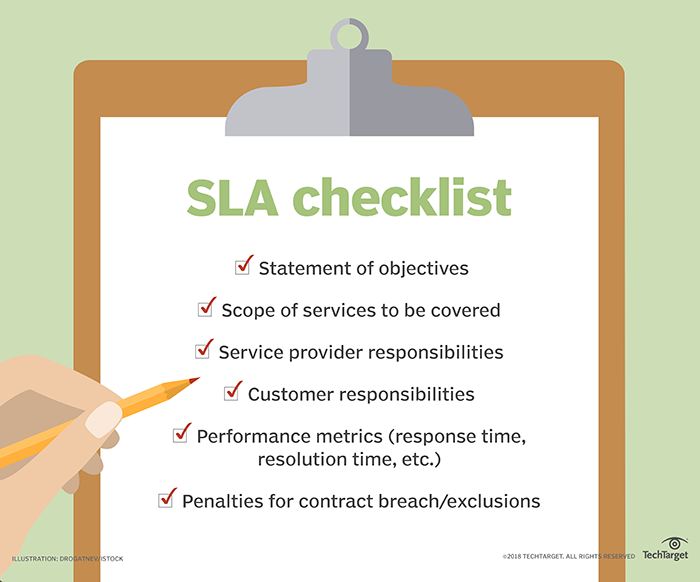
IT SLA Checklist via TechTarget
Follow these best practices when building SLA policies:
- Define clear priority levels
- Align SLAs with business hours
- Create internal OLAs to support deadlines
- Automate tracking with help desk software
- Review SLA reports monthly
- Adjust SLAs as your organization grows
Avoid these common mistakes:
- Setting unrealistic deadlines
- Failing to define what "resolution" means
- Ignoring time zone differences
- Not tracking breaches
- Forgetting to communicate SLA terms to customers
How Mojo Helpdesk Makes SLA Management Easier
Mojo Helpdesk helps IT and support teams manage SLAs without manual tracking.
With Mojo, you can:
- Configure multiple SLA policies
- Automatically assign SLAs by priority or customer type
- Set escalation rules
- Monitor compliance in real time
- Generate detailed SLA reports
You can also pair SLA management with:
- Knowledge base software to reduce ticket volume
- Automated workflows to speed up resolutions
- Custom ticket queues for better prioritization